

Take you business next level

Take you business next level
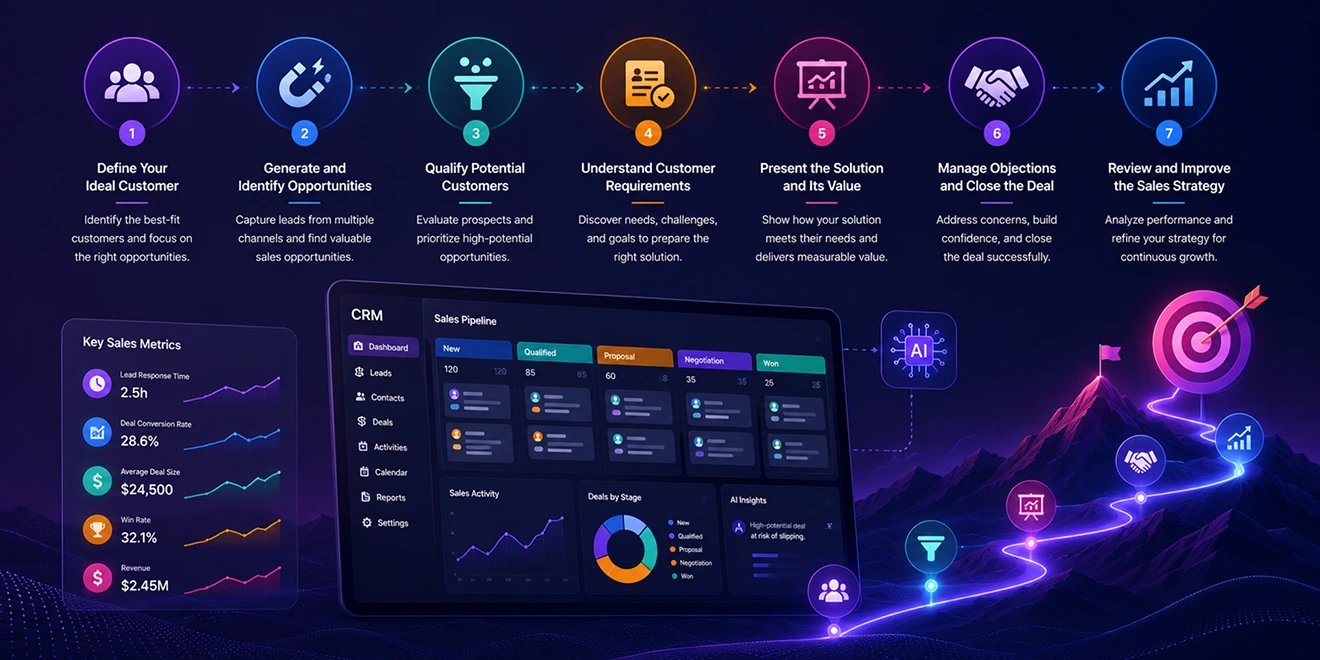
A sales process is a structured series of steps that helps sales teams move potential customers from initial contact to purchase. A sales strategy defines how the business identifies its ideal customers, communicates value, manages opportunities, and achieves its revenue goals.
AI-powered CRM connects the sales process with customer data, automation, and real-time insights, helping teams work consistently and make better decisions.
An effective sales strategy begins with identifying the customers most likely to benefit from your product or service. This helps sales teams focus their time on relevant prospects instead of approaching every possible lead.
An ideal customer profile may include:
AI can analyze existing customer data to identify common characteristics among valuable and successful customers.
Sales opportunities can come from websites, forms, marketing campaigns, referrals, events, advertisements, social media, calls, emails, live chat, and other lead generation channels.
CRM should record the source of every lead and connect it with related customer interactions. This helps teams understand which channels generate valuable opportunities and where they should focus their sales and marketing efforts.
AI-powered lead scoring can support qualification by analyzing customer profiles, engagement, and buying signals.
Qualification questions may include:
AI-powered lead scoring can support qualification by analyzing customer profiles, engagement, and buying signals.
Representatives should record important requirements, objections, decision criteria, and next steps within a 360° contact view. AI can summarize conversations and highlight important discussion points, helping teams prepare more relevant recommendations.
Representatives should record important requirements, objections, decision criteria, and next steps in CRM. AI can summarize conversations and highlight important discussion points, helping teams prepare more relevant recommendations.
The sales presentation should connect the product or service directly to the customer's requirements. Instead of listing every feature, representatives should explain how the solution addresses specific challenges and delivers measurable value.
Sales teams can use:
AI can help prepare personalized emails, presentations, proposals, and follow-up messages using the available customer context.
Prospects may raise concerns about pricing, features, implementation, security, integrations, or contract terms. Sales representatives should listen carefully, understand the reason behind each objection, and provide clear and accurate responses.
Once the prospect is ready, the team can finalize pricing, prepare the agreement, collect approval, obtain an electronic signature, and update the deal as won. The next steps for payment, implementation, and onboarding should also be communicated clearly.
CRM reporting can identify performance patterns, pipeline bottlenecks, and successful sales activities. Teams can use these insights to improve qualification, communication, follow-ups, and overall sales strategy.
Important performance indicators include:
AI-powered reports can identify performance patterns, pipeline bottlenecks, and successful sales activities. Teams can use these insights to improve qualification, communication, follow-ups, and overall sales strategy.
Integrate the tools you use every day and keep your sales data connected in one platform.






Discover how GoFox helps your sales team manage leads, automate follow-ups, and close deals with confidence, all from one intelligent CRM.
Get Started FreeReal feedback from teams who switched to a simpler way of managing customers and projects.
"This CRM completely transformed how our sales team manages customers. Within three months, we increased productivity by 35% and improved team communication significantly."
"Our team finally stopped juggling countless spreadsheets and switched to a cleaner, more efficient workflow solution."
"We moved away from messy manual processes and embraced a smoother workflow that keeps our whole team aligned."
"In just one day, our whole team was seamlessly collaborating and managing projects through a single dashboard."
CRM CRD is a modern CRM platform designed to simplify customer management. It streamlines daily tasks, organizes interactions, automates follow-ups, and helps teams collaborate more efficiently.
"Within just 60 seconds, our complete CRM system was set up and ready for immediate use."
"Our customer response time has improved by 40%, helping us provide faster and more efficient support."