

Take you business next level

Take you business next level
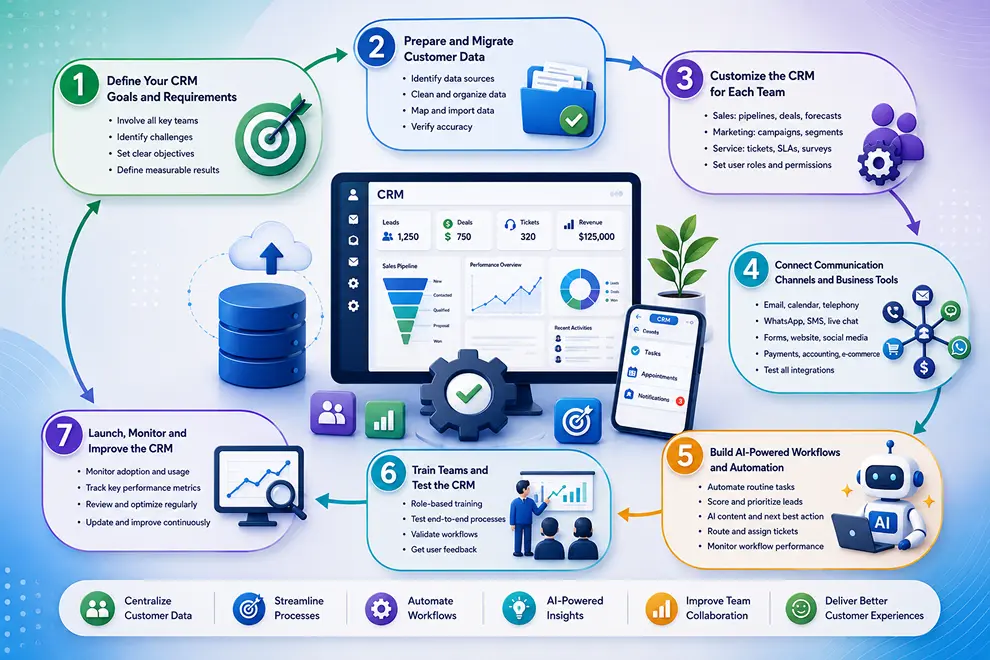
CRM implementation involves planning, configuring, testing, and introducing CRM software across your business. A successful setup should bring customer data into one platform, connect sales, marketing, and service processes, and make everyday work easier for employees.
For an AI-powered CRM, implementation should also include identifying where AI and automation can reduce manual work, improve customer engagement, and support better decisions.
Before setting up CRM software, identify the problems it needs to solve and the results your business expects. Involve representatives from sales, marketing, service, management, and IT so the system supports every department.
Your implementation goals may include:
Convert these goals into measurable results, such as reducing response times, improving follow-up completion, increasing conversions, or resolving tickets faster.
Review your existing customer data before moving it into the CRM. Information may be stored in spreadsheets, email platforms, accounting software, old CRM systems, or separate departmental tools.
Remove duplicate records, correct errors, update outdated information, and standardize important fields such as names, phone numbers, locations, and company details. Decide which records must be migrated and which can be archived.
The migration process generally includes:
Clean and structured data also allows AI-powered CRM features to generate more reliable recommendations and insights.
Configure the CRM according to how your sales, marketing, and service teams work. Avoid adding unnecessary fields or complicated processes that may make the platform difficult to use.
You should also define user roles and permissions so employees can access only the data and functions required for their responsibilities.
Integrate the CRM with the applications your teams already use. This allows information to move between systems and creates a complete record of customer interactions.
Important connections may include:
Test each integration to confirm that records update correctly, activities appear under the right customer, and duplicate data is not created.
Begin by automating simple, repetitive activities that have clear rules. Once these workflows are working correctly, you can introduce more advanced automation across the customer journey.
For example, when a new lead submits a form, the CRM can create a profile, assign the lead, send a personalized response, schedule a follow-up, and add the contact to a nurturing campaign.
AI-powered automation can also help teams:
Every workflow should have a clear owner, trigger, action, and expected result.
Provide role-based training instead of showing every feature to every employee. Sales representatives should learn lead and pipeline management, marketers should understand campaigns and segmentation, and service agents should practice ticket management and customer communication.
Before launching the CRM, test complete processes such as:
Collect feedback from a small group of users and resolve problems before introducing the system across the entire business.
Introduce the CRM in stages or launch it across the business based on your team size and process complexity. Provide setup documentation, internal support, and clear instructions about how customer information should be entered and maintained.
After launch, monitor:
Review the CRM regularly as your business processes change. Update fields, workflows, reports, integrations, and AI settings to ensure the platform continues to support your teams and customers effectively.
Integrate the tools you use every day and keep your sales data connected in one platform.






Discover how GoFox helps your sales team manage leads, automate follow-ups, and close deals with confidence, all from one intelligent CRM.
Get Started FreeReal feedback from teams who switched to a simpler way of managing customers and projects.
"This CRM completely transformed how our sales team manages customers. Within three months, we increased productivity by 35% and improved team communication significantly."
"Our team finally stopped juggling countless spreadsheets and switched to a cleaner, more efficient workflow solution."
"We moved away from messy manual processes and embraced a smoother workflow that keeps our whole team aligned."
"In just one day, our whole team was seamlessly collaborating and managing projects through a single dashboard."
CRM CRD is a modern CRM platform designed to simplify customer management. It streamlines daily tasks, organizes interactions, automates follow-ups, and helps teams collaborate more efficiently.
"Within just 60 seconds, our complete CRM system was set up and ready for immediate use."
"Our customer response time has improved by 40%, helping us provide faster and more efficient support."