

Take you business next level

Take you business next level
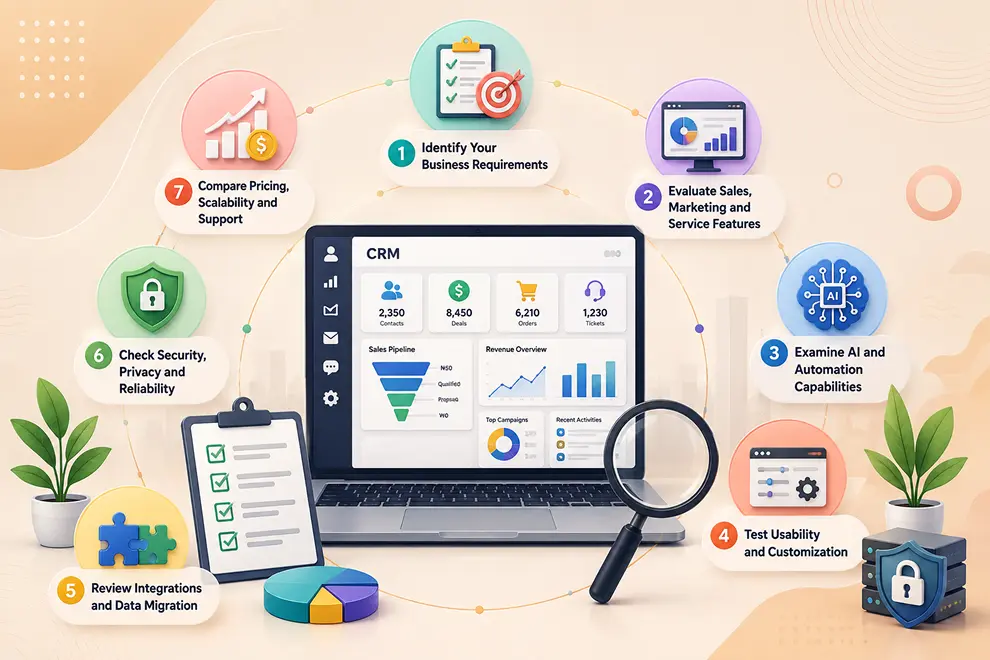
Evaluating CRM software requires more than checking a list of features or selecting the lowest-priced plan. The right CRM should match your business goals, support sales, marketing, and service teams, integrate with existing tools, and adapt as your company grows.
When evaluating an AI-powered CRM, you should also confirm whether its AI capabilities solve practical business problems instead of simply adding unnecessary features.
Start by understanding the problems you want the CRM to solve. Speak with sales, marketing, service, management, and IT teams to identify their daily challenges and essential requirements.
Consider questions such as:
Separate essential requirements from optional features. This prevents your business from selecting a complicated platform with tools your teams may never use.
An all-in-one CRM should support the complete customer journey rather than focusing only on sales. Examine how well the platform connects customer acquisition, deal management, marketing engagement, and ongoing service.
Information should move smoothly between these teams without creating duplicate customer records or disconnected processes.
AI should help employees reduce manual work, understand customer information, and make better decisions. Ask the provider to demonstrate how the platform’s AI features work with real business scenarios.
Useful AI-powered CRM capabilities may include:
Also examine how easily workflows can be created, updated, and monitored. Teams should be able to automate common processes without depending on technical support for every change.
A CRM may offer many features, but it will provide limited value if employees find it difficult to use. Request a live demonstration or free trial and allow representatives from different departments to test the platform.
Evaluate the CRM’s navigation, customer profiles, dashboards, search functions, mobile accessibility, and task management. Common activities such as adding a lead, launching a campaign, updating a deal, and resolving a ticket should be simple to complete.
The platform should also allow you to customize:
Customization helps the CRM fit your existing business processes while providing flexibility for future changes.
CRM software should connect with the applications your business already uses. Suitable integrations reduce repeated data entry and help teams maintain a complete customer record.
Check whether the CRM integrates with email, calendars, telephony, WhatsApp, SMS, social media, accounting, payments, e-commerce, video meetings, e-signatures, and other essential platforms.
You should also evaluate the data migration process. Confirm whether contacts, companies, deals, activities, notes, and other records can be transferred accurately from spreadsheets or an existing CRM. Ask how duplicate records, missing fields, and data formats will be handled during migration.
CRM software stores sensitive customer and business information, making security an important part of the evaluation.
Review the platform’s:
Your business should retain control over who can access, edit, export, or delete customer information. You should also understand how customer data is used when AI features process conversations, documents, or records.
Review the complete cost of using the CRM rather than only its advertised starting price. Costs may vary based on users, contacts, storage, email limits, AI credits, automation, integrations, reports, and customer service options.
Consider whether the CRM can support:
Also evaluate onboarding, training resources, documentation, response times, and available service channels. A scalable platform with reliable assistance can provide more long-term value than a low-cost CRM that requires replacement when the business grows.
Integrate the tools you use every day and keep your sales data connected in one platform.






Discover how GoFox helps your sales team manage leads, automate follow-ups, and close deals with confidence, all from one intelligent CRM.
Get Started FreeReal feedback from teams who switched to a simpler way of managing customers and projects.
"This CRM completely transformed how our sales team manages customers. Within three months, we increased productivity by 35% and improved team communication significantly."
"Our team finally stopped juggling countless spreadsheets and switched to a cleaner, more efficient workflow solution."
"We moved away from messy manual processes and embraced a smoother workflow that keeps our whole team aligned."
"In just one day, our whole team was seamlessly collaborating and managing projects through a single dashboard."
CRM CRD is a modern CRM platform designed to simplify customer management. It streamlines daily tasks, organizes interactions, automates follow-ups, and helps teams collaborate more efficiently.
"Within just 60 seconds, our complete CRM system was set up and ready for immediate use."
"Our customer response time has improved by 40%, helping us provide faster and more efficient support."