

Take you business next level

Take you business next level
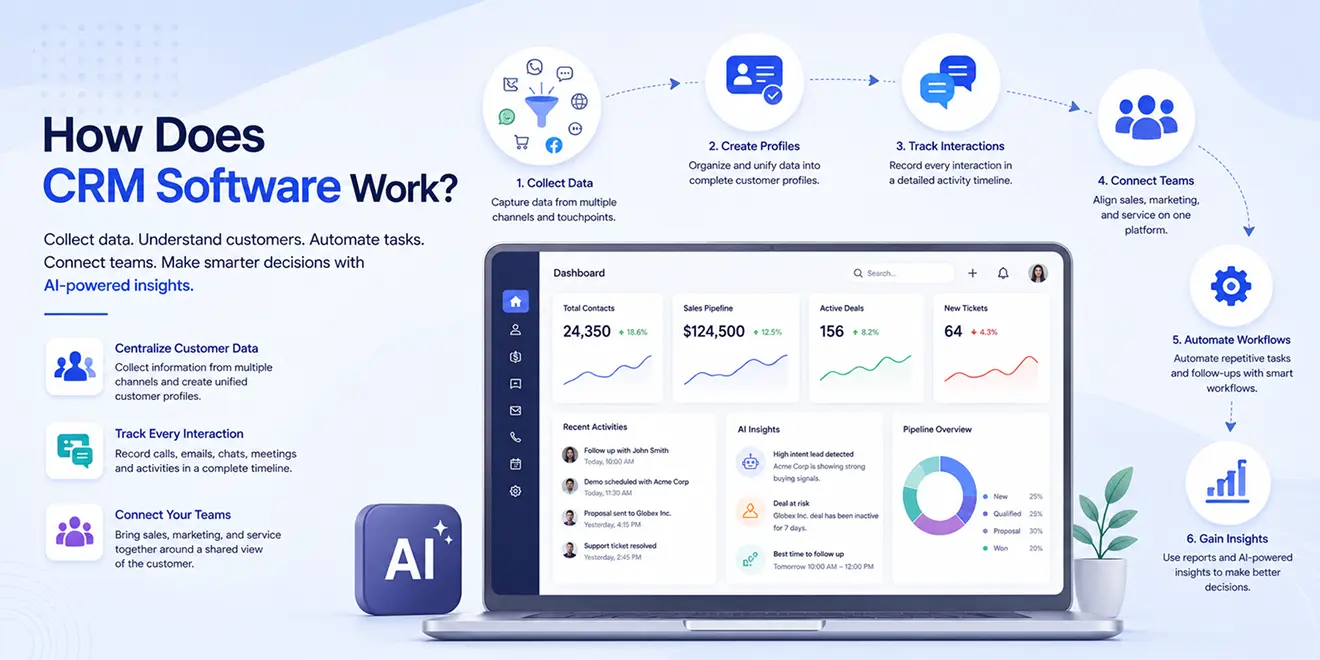
CRM software works by collecting customer data from multiple channels and organizing it in one centralized platform. It helps businesses track interactions, manage customer relationships, automate repetitive activities, and connect sales, marketing, and service teams.
An AI-powered CRM also analyzes customer data, identifies patterns, recommends actions, and helps teams make faster and more informed decisions throughout the customer journey.
CRM software collects information whenever a lead or customer interacts with a business. These interactions may happen through websites, emails, phone calls, chat, social media, marketing campaigns, or service requests.
Customer information can enter the CRM through:
AI can reduce manual data entry by identifying important information from conversations, calls, and messages and adding it to the relevant customer profile.
After collecting customer data, CRM software organizes it into individual contact and company profiles. Each profile provides a complete view of the relationship between the customer and the business.
A customer profile may include:
This unified profile allows teams to understand customers without searching through separate spreadsheets, inboxes, or applications. AI-powered CRM software can also summarize lengthy customer histories and highlight the information most relevant to the next conversation.
CRM software records customer interactions and displays them in a clear activity timeline. Whenever a customer opens an email, submits a form, attends a meeting, requests a quotation, makes a purchase, or raises a service ticket, the CRM updates the customer’s history.
Interaction tracking helps teams:
AI can examine interaction patterns and identify signs of buying interest, reduced engagement, or customer dissatisfaction. Teams can then respond before an opportunity is lost or an issue becomes more serious.
CRM software connects different departments around a shared view of the customer. Each team can access relevant information and continue the customer journey from where the previous interaction ended.
Because all three teams use connected information, customers receive more relevant communication and do not need to repeat the same details.
CRM automation uses triggers, conditions, and actions to complete repetitive tasks automatically. These workflows help teams follow consistent processes while reducing manual effort.
For example, when someone submits a website form, the CRM can automatically:
CRM automation can also manage appointment reminders, deal updates, email sequences, ticket assignments, service escalations, and customer feedback requests.
AI makes automation more intelligent by considering customer behavior and engagement. It can help determine which leads require attention, when a follow-up should happen, and which message may be most relevant.
Most businesses use multiple applications to communicate with customers and manage daily operations. CRM integrations connect these tools and allow information to move between them automatically.
A CRM can connect with:
For example, when a sales representative completes a customer call, the activity can be recorded automatically in the CRM. If a customer makes a payment or signs a proposal, the relevant record can also be updated.
These connections help teams manage customer interactions from one platform and reduce the need to enter the same information in multiple systems.
CRM software converts customer and business data into dashboards, reports, and performance insights. These reports give teams a clear understanding of their activities, results, and areas requiring improvement.
Businesses can use CRM reports to monitor:
Traditional reports explain what has already happened. AI-powered CRM insights can go further by identifying trends, predicting possible outcomes, and recommending the next action.
For example, AI may highlight a deal that is at risk, identify a lead showing strong buying intent, or detect a change in customer engagement. This allows teams to take timely action based on data rather than assumptions.
Integrate the tools you use every day and keep your sales data connected in one platform.






Discover how GoFox helps your sales team manage leads, automate follow-ups, and close deals with confidence, all from one intelligent CRM.
Get Started FreeReal feedback from teams who switched to a simpler way of managing customers and projects.
"This CRM completely transformed how our sales team manages customers. Within three months, we increased productivity by 35% and improved team communication significantly."
"Our team finally stopped juggling countless spreadsheets and switched to a cleaner, more efficient workflow solution."
"We moved away from messy manual processes and embraced a smoother workflow that keeps our whole team aligned."
"In just one day, our whole team was seamlessly collaborating and managing projects through a single dashboard."
CRM CRD is a modern CRM platform designed to simplify customer management. It streamlines daily tasks, organizes interactions, automates follow-ups, and helps teams collaborate more efficiently.
"Within just 60 seconds, our complete CRM system was set up and ready for immediate use."
"Our customer response time has improved by 40%, helping us provide faster and more efficient support."