

Take you business next level

Take you business next level
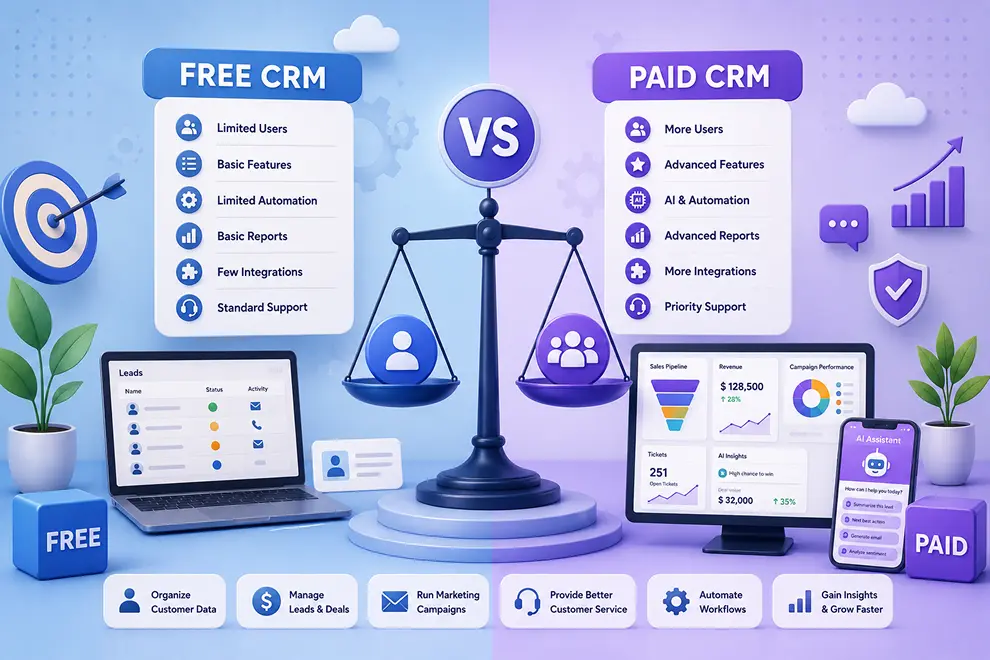
Free and paid CRM software both help businesses organize customer data and manage customer relationships. However, they differ in user limits, automation, AI capabilities, integrations, customization, reporting, storage, and customer service.
A free CRM can be suitable for small teams with basic requirements, while a paid CRM is generally better for growing businesses that need advanced sales, marketing, and service capabilities.
| Area | Free CRM | Paid CRM |
|---|---|---|
| Users | Usually limited | Supports larger teams |
| Customer records | Basic or limited | Higher or customizable limits |
| Sales features | Basic contact and deal management | Advanced pipelines, forecasting and automation |
| Marketing | Simple campaigns | Segmentation, personalization and multichannel automation |
| Service | Basic ticket management | SLAs, workflows, portals and advanced reporting |
| AI features | Limited access or credits | Broader AI tools and higher usage |
| Integrations | Few standard connections | More native and custom integrations |
| Support | Documentation or community support | Priority email, chat, phone or onboarding support |
Free CRM plans usually provide essential tools for organizing contacts, tracking interactions, managing basic deals, and scheduling activities. These capabilities may be enough for startups, freelancers, and small teams beginning to organize their customer information.
Paid CRM plans generally provide broader features across:
Before selecting a plan, businesses should confirm whether it supports the complete customer journey rather than focusing only on contact and sales management.
Free CRM software may restrict the number of users, customer records, email sends, workflows, reports, file storage, or connected applications. These limits may not affect a small business initially, but they can become challenging as the team and customer database grow.
Paid plans offer higher limits or allow businesses to expand resources according to their requirements. Review both current and future needs so that your team does not need to migrate to another platform shortly after implementation.
Free CRM plans may provide basic automation or a limited number of AI credits. Businesses may be able to automate simple tasks, generate a few messages, or test AI-assisted features before upgrading.
Paid CRM plans usually offer more advanced capabilities, including:
Businesses should evaluate whether AI features reduce practical work and improve decisions. The number of AI credits, supported use cases, and additional charges should also be considered.
A free CRM may include standard fields, pipelines, reports, and a limited selection of integrations. This can work for teams with simple processes, but it may become restrictive when departments require different workflows.
Paid CRM software generally offers more control over custom fields, sales stages, marketing segments, ticket categories, dashboards, permissions, and automation rules. It may also connect with a wider range of email, telephony, WhatsApp, accounting, payment, e-commerce, and service platforms.
Free plans commonly provide basic reports that show contact, sales, or activity information. Paid plans may include customizable dashboards, detailed marketing reports, service analytics, sales forecasts, and AI-powered insights.
Security and customer service may also vary between plans. Businesses should review:
Companies managing sensitive customer data or complex team structures may require the advanced controls available in paid plans.
Choose a free CRM if you have a small team, a limited customer database, simple sales processes, and only basic automation requirements. It can also be useful for testing a platform’s usability before making a long-term decision.
Choose a paid CRM if your business needs connected sales, marketing, and service tools, advanced AI capabilities, multiple workflows, detailed reports, greater customization, more integrations, and dedicated support.
The right choice depends on the value the CRM delivers rather than its price alone. A free plan that restricts essential processes may create additional manual work, while a suitable paid plan can improve productivity and support business growth.
Integrate the tools you use every day and keep your sales data connected in one platform.






Discover how GoFox helps your sales team manage leads, automate follow-ups, and close deals with confidence, all from one intelligent CRM.
Get Started FreeReal feedback from teams who switched to a simpler way of managing customers and projects.
"This CRM completely transformed how our sales team manages customers. Within three months, we increased productivity by 35% and improved team communication significantly."
"Our team finally stopped juggling countless spreadsheets and switched to a cleaner, more efficient workflow solution."
"We moved away from messy manual processes and embraced a smoother workflow that keeps our whole team aligned."
"In just one day, our whole team was seamlessly collaborating and managing projects through a single dashboard."
CRM CRD is a modern CRM platform designed to simplify customer management. It streamlines daily tasks, organizes interactions, automates follow-ups, and helps teams collaborate more efficiently.
"Within just 60 seconds, our complete CRM system was set up and ready for immediate use."
"Our customer response time has improved by 40%, helping us provide faster and more efficient support."