

Take you business next level

Take you business next level
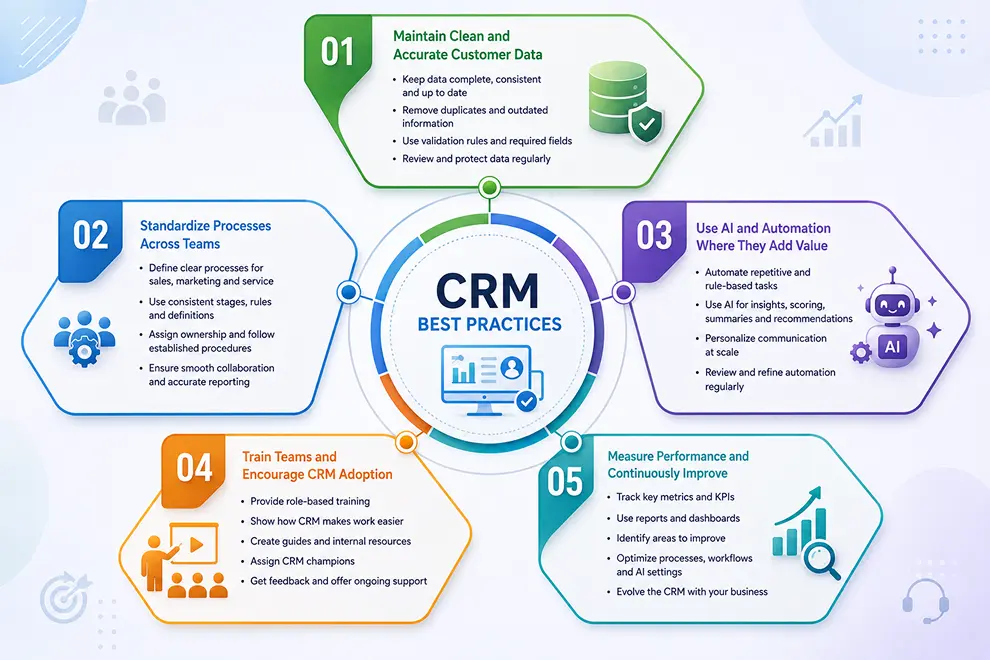
CRM software delivers the most value when teams use it consistently and maintain accurate customer information. Following the right CRM best practices helps businesses improve adoption, automate processes, and create connected experiences across sales, marketing, and service.
For an AI-powered CRM, high-quality data and clearly defined processes are especially important because AI recommendations depend on the information available in the system.
Customer data should be complete, consistent, and regularly updated. Duplicate, outdated, or incorrect records can affect communication, reports, automation, and AI-generated insights.
Establish clear rules for entering:
Use validation rules, duplicate detection, required fields, and scheduled data reviews. Access permissions should also be configured to protect sensitive customer information.
Define how sales, marketing, and service teams should use the CRM at every stage of the customer journey. Employees should understand who owns each record, when it should be updated, and which action should happen next.
Sales teams should follow consistent lead and pipeline stages. Marketing teams should use agreed audience segments and campaign processes. Service teams should follow clear ticket priorities, assignment rules, SLA policies, and escalation procedures.
Standardized processes improve collaboration and ensure that CRM reports reflect what is actually happening across the business.
Automation should reduce repetitive work without making customer communication feel impersonal. Begin with simple processes that are easy to understand, test, and measure.
AI-powered CRM can help businesses:
Review automated actions regularly to ensure they remain accurate, relevant, and aligned with customer expectations.
A CRM cannot provide reliable results if employees do not use it consistently. Provide role-based training that focuses on the tasks each department performs instead of introducing every available feature at once.
Show employees how the CRM reduces manual work, improves customer context, and helps them complete daily activities. Create simple internal guides, assign CRM owners, collect employee feedback, and provide additional training when new features or workflows are introduced.
Management should also use CRM dashboards and reports during reviews so that the platform becomes part of everyday decision-making.
Review CRM performance regularly to understand whether the platform is helping teams achieve their goals. Different departments should monitor metrics that reflect their responsibilities.
Use these insights to improve pipelines, customer segments, workflows, reports, and AI settings. As your business grows, continue updating the CRM so it reflects your changing teams, processes, and customer needs.
Integrate the tools you use every day and keep your sales data connected in one platform.






Discover how GoFox helps your sales team manage leads, automate follow-ups, and close deals with confidence, all from one intelligent CRM.
Get Started FreeReal feedback from teams who switched to a simpler way of managing customers and projects.
"This CRM completely transformed how our sales team manages customers. Within three months, we increased productivity by 35% and improved team communication significantly."
"Our team finally stopped juggling countless spreadsheets and switched to a cleaner, more efficient workflow solution."
"We moved away from messy manual processes and embraced a smoother workflow that keeps our whole team aligned."
"In just one day, our whole team was seamlessly collaborating and managing projects through a single dashboard."
CRM CRD is a modern CRM platform designed to simplify customer management. It streamlines daily tasks, organizes interactions, automates follow-ups, and helps teams collaborate more efficiently.
"Within just 60 seconds, our complete CRM system was set up and ready for immediate use."
"Our customer response time has improved by 40%, helping us provide faster and more efficient support."