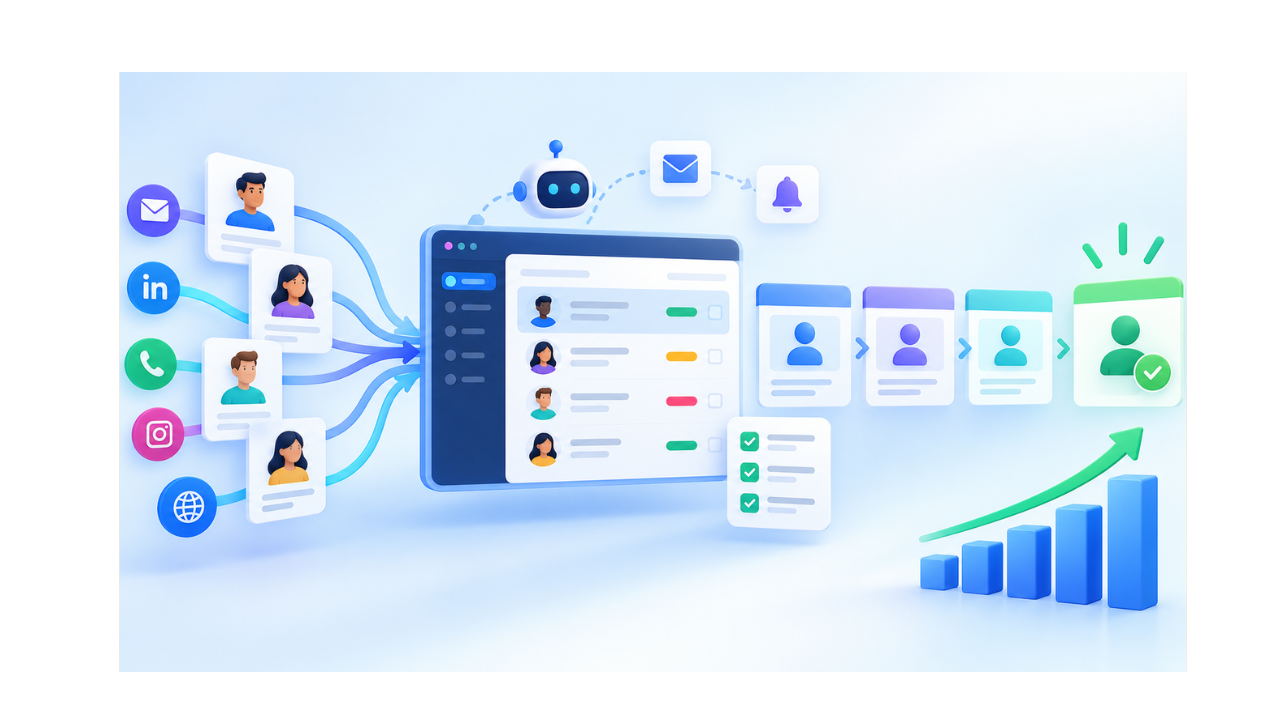
Your sales team gets 200 leads this month. Only 12 turn into customers. The rest sit in a spreadsheet, an inbox, or a sticky note on someone’s desk. A prospect fills out a form and waits three days for a reply. By then they already bought from a competitor.
This is what happens without a system. Leads come in from many places, details get lost, follow-ups get skipped, and sales reps don’t know who owns which lead. Marketing sends leads that sales never touches.
Lead management software fixes this. It gives your team one place to capture, organize, and guide every lead from first contact to closed deal.
What Is Lead Management Software?
Lead management software is a system that helps businesses capture, organize, qualify, assign, nurture, track, and convert potential customers.
It replaces scattered spreadsheets and separate tools with one shared workspace. Using contact management software, sales and marketing teams can access the same lead details, communication history, and buying signals.
A good system holds contact details and company information, every call, email, and meeting, website visits and content downloads, the lead’s current stage in the sales pipeline, and which rep owns it. This shared view stops leads from falling through cracks between departments.
How Does Lead Management Software Work?
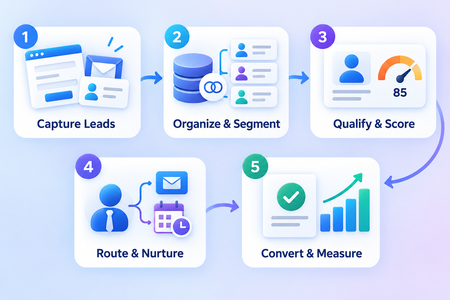
Lead management software moves prospects through a structured process, from initial capture to final conversion.
Captures leads: Collects leads from website forms, landing pages, advertisements, emails, social media, live chat, calls, and integrations.
Centralizes lead information: Stores contact details, communication history, activities, notes, and interests in one record.
Removes duplicate records: Identifies repeated entries and combines them to maintain accurate lead information.
Segments leads: Groups leads according to source, location, industry, behavior, interests, or sales stage.
Qualifies prospects: Checks each lead against defined business criteria to determine whether they are a suitable potential customer.
Scores leads: Assigns values based on profile fit, engagement, behavior, and purchase intent.
Routes leads: Automatically assigns qualified leads to the appropriate sales representative.
Automates lead nurturing: Sends relevant emails, follow-up messages, reminders, and content based on each lead’s activity.
Converts leads into deals: Uses deal management software to move sales-ready leads into the deal pipeline for negotiation and closing.
Measures performance: Tracks conversion rates, response times, lead sources, sales activity, and other important results.
Each step reduces manual work, prevents leads from sitting idle, and keeps prospects moving through the sales process.
How Do You Capture Leads From Multiple Channels?
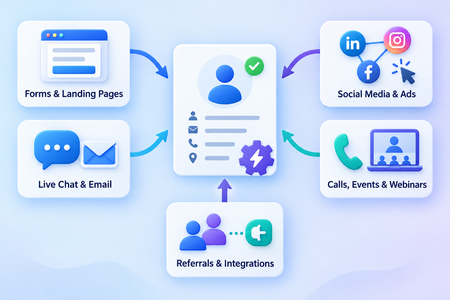
Lead capture software pulls prospect information automatically from every channel a business uses.
Leads come from many places:
- Website forms and landing pages
- Live chat and email campaigns
- Social media and online advertisements
- Phone calls, events, and webinars
- Referral campaigns and third-party integrations
Automatic capture removes manual data entry. A form submission or a chat message becomes a lead record in seconds. Nothing gets typed twice, and nothing gets forgotten in someone’s inbox.
How Do You Qualify and Prioritize Sales-Ready Leads?
Lead qualification identifies which prospects match your ideal customer profile, so reps spend time on leads likely to buy.
Lead scoring software ranks leads using signals such as:
- Company size, industry, job role, and location
- Website visits and email engagement
- Content downloads and form submissions
- Product interest and buying intent
A lead who visits your pricing page five times and downloads a case study scores higher than one who only viewed your homepage once. Reps see this ranking and know exactly where to focus first.
How Do You Assign Leads to the Right Sales Representatives?
Automated lead distribution routes each lead to the rep best positioned to close it.
Assignment rules can factor in sales territory, geographic location, product interest, and industry knowledge, as well as representative availability, deal value, team workload, and round-robin rules. Immediate assignment cuts response time.
A lead assigned within minutes gets a reply within minutes, and ownership stays clear, so no lead sits unclaimed while two reps assume the other is handling it.
How Do You Nurture Leads With Personalized Follow-Ups?
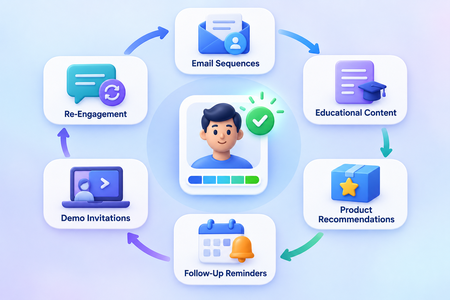
Lead nurturing keeps prospects engaged until they’re ready to buy.
Not every lead converts on the first contact. Most need several touches before they decide, through personalized email sequences, educational content, and product recommendations, or through follow-up reminders, appointment invitations, product demonstrations, targeted offers, and re-engagement campaigns.
Personalized communication builds trust over time. A prospect who receives relevant content instead of generic sales pitches stays engaged longer and converts at a higher rate.
What Lead Management Activities Can You Automate?
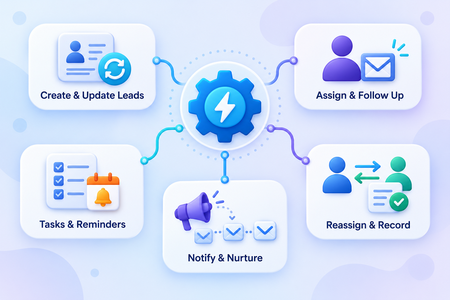
AI sales workflows automate repetitive lead management activities so representatives can focus on conversations that help close deals.
Automation can take over:
- Creating lead records and updating lead stages
- Assigning lead owners and sending follow-up emails
- Creating sales tasks and scheduling reminders
- Notifying representatives and starting nurture sequences
- Reassigning inactive leads and recording completed activities
A rep no longer needs to manually log a call or set a reminder for next week. The system does it, and the rep spends that time talking to prospects instead.
How Do You Track Leads Through the Sales Pipeline?
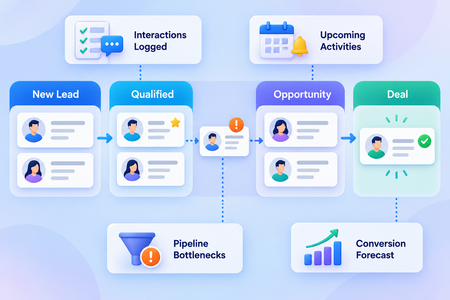
Lead tracking software records every interaction and helps teams understand where each lead stands.
- Record every interaction: Automatically logs calls, emails, meetings, notes, tasks, and stage changes.
- Monitor lead stages: Shows each lead’s current position within the sales pipeline.
- Identify stalled leads: Finds leads that have remained inactive or have not received a recent follow-up.
- View upcoming activities: Displays scheduled calls, meetings, emails, tasks, and follow-up reminders.
- Find pipeline bottlenecks: Highlights stages where leads slow down or frequently leave the sales process.
- Forecast conversions: Uses pipeline activity and lead progress to estimate possible sales results.
- Create opportunities: Moves qualified leads into active sales opportunities when they show purchase intent.
- Connect leads with deals: Links lead information, conversations, and activities directly to the related deal.
- Prioritize daily actions: Helps managers and sales representatives identify which leads need immediate attention.
Effective sales pipeline management gives teams a clear view of every lead and helps prevent valuable opportunities from going cold.
How Does AI Improve Lead Conversions?
An AI-powered CRM analyzes lead behavior and tells reps exactly what to do next.
AI and analytics help teams predict which leads may convert and recommend the next best action. They identify high-value opportunities, summarize previous interactions, and detect inactive leads.
CRM reporting helps teams measure the performance of their lead management process using important metrics such as:
Tracking the right metrics shows what’s working and what needs fixing:
- Lead response time and lead qualification rate
- Marketing-qualified leads and sales-qualified leads
- Lead-to-opportunity rate and lead-to-customer conversion rate
- Average sales cycle and cost per lead
- Lead source performance and revenue by lead source
These numbers show exactly where leads drop off, so teams can fix the weak points in their process.
Convert More Leads With GoFox
Lead management software connects capture, qualification, scoring, assignment, nurturing, automation, and performance tracking into one system. Sales teams get the information they need to respond fast and focus on the leads worth chasing.
Capture leads, automate follow-ups, prioritize sales-ready prospects, and manage every opportunity with GoFox’s AI-powered CRM. Sign up for free and start converting more lead
