A sales rep updates a deal in one tool. Marketing tracks campaigns in another. Support logs tickets somewhere else. Nobody has the full picture, and by the time reports get pulled together, the numbers are already outdated.
Business management software fixes this by bringing every department into one connected system. Instead of switching between five disconnected tools, a business runs sales, marketing, service, and reporting from a single platform.
This is the difference between chasing data across scattered spreadsheets and having clear business operations management in one place, updated in real time.
What Is Business Management Software?
Business management software is a platform that combines sales, marketing, service, Task Management, customer data, and reporting into one connected system.
Instead of using separate tools for each function, a business management system covers:
- Customer and contact records
- Sales pipelines and deal tracking
- Marketing campaigns and automation
- Task and project management
- Customer service and support tickets
- Business reporting and dashboards
Every department pulls from the same data. A sales rep sees the same customer history a support agent sees. A manager pulls one report instead of stitching together numbers from five sources.
How Does Business Management Software Work?
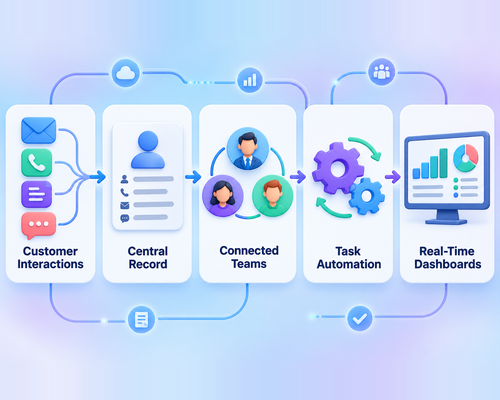
Business management software works by collecting data from every department, connecting it in one system, and automating the repetitive tasks that slow teams down.
Here’s what happens behind the scenes:
- Customer interactions from email, calls, forms, and chat feed into one central record
- Sales, marketing, and service teams work from the same connected data
- Business process automation handles repetitive tasks like data entry and follow-ups
- Dashboards update in real time as new information comes in
This setup means a manager doesn’t wait until the end of the month to know how the business is doing. An all-in-one business software platform surfaces the numbers the moment they change, so decisions happen faster and with less guesswork.
Essential Features of Business Management Software
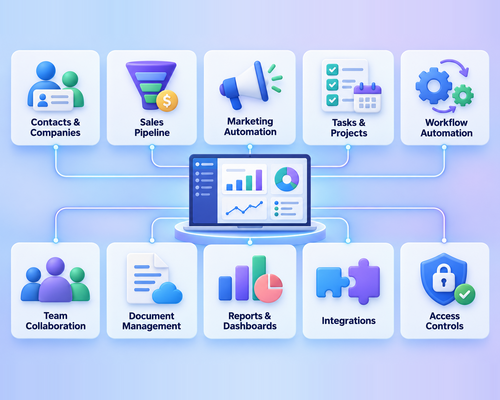
The right platform needs more than a single feature. It needs a full set of tools that cover how a business actually runs day to day.
- Contact and company management: A single record for every customer and account
- Sales pipeline management: Visual tracking of deals from first contact to close
- Marketing automation: Automated campaigns triggered by customer behavior
- Task and project management: Assign, track, and complete work without losing details
- Workflow automation: Repetitive steps handled automatically, without manual input
- Team collaboration: Shared notes, updates, and communication in one place
- Document management: Contracts, proposals, and files stored where the team can find them
- Reports and dashboards: Live numbers on sales, marketing, and service performance
- Integrations: Connections to the other tools a business already uses
- User access controls: Permissions that keep sensitive data limited to the right people
Sales management software alone can’t cover all of this. A complete platform pulls these pieces together so no team works in isolation.
Benefits of Business Management Software
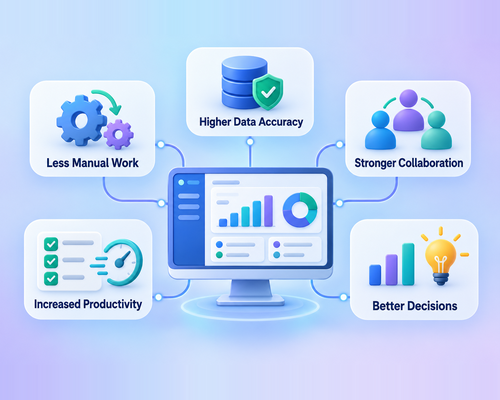
The impact of a connected system shows up across the entire business.
- Less manual work since data entry and repetitive tasks run on their own
- Higher data accuracy with one source of truth instead of scattered spreadsheets
- Stronger collaboration since every team sees the same customer information
- Increased productivity as employees spend less time switching between tools
- Better decision-making backed by live, accurate numbers instead of guesswork
A business management system turns daily operations from a scramble into a process. Business operations management stops depending on one person remembering where a file or update lives.
How It Supports Sales, Marketing, and Service Teams
Each department gets something different from the same connected platform.
- Sales teams manage leads and deals through a visual pipeline, track follow-ups, and see which prospects are closest to closing
- Marketing teams use marketing automation software to launch campaigns, track engagement, and follow up automatically based on customer actions
- Service teams track customer conversations and support requests in one place, so no ticket falls through the cracks
Customer relationship management ties all three teams together. A support agent can see a customer’s full sales history before responding to a ticket, and a sales rep can see open support issues before reaching out to close a renewal.
How Business Process Automation Improves Efficiency
Manual work is where most operational time gets lost. Business process automation removes the repetitive steps that eat into a team’s day.
- Automated data entry pulls information from forms and emails without manual input
- Lead assignment routes new leads to the right rep the moment they come in
- Follow-up reminders trigger automatically based on deal stage or customer activity
- Task creation happens without someone having to remember to set it up
- Notifications alert the right person the moment action is needed
- Record updates stay current without anyone manually editing every field
Workflow automation gives teams back the hours they used to spend on repetitive tasks, so they can focus on the work that actually needs a human decision.
How to Choose the Right Business Management Software
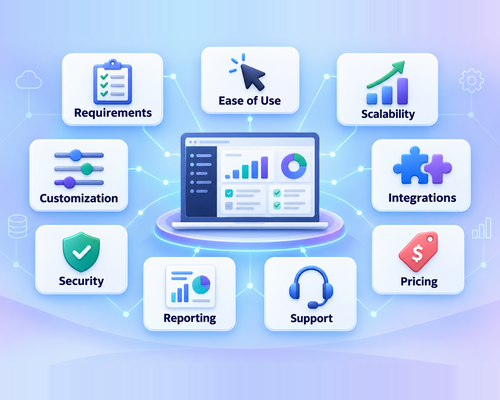
Not every platform fits every business. A few factors make the difference between a good fit and a frustrating one.
- Business requirements: Match the software to the actual departments and processes it needs to support
- Ease of use: A platform teams can adopt quickly without months of training
- Scalability: Room to grow as the business adds users, customers, and complexity
- Customization: The ability to adjust fields, workflows, and views to match how the team works
- Integrations: Compatibility with the tools already in use
- Security: Proper data protection and access controls
- Reporting: Dashboards that show the metrics that matter most
- Support: Responsive help when something needs fixing
- Pricing: A plan that fits the budget without cutting essential features
The right business management software checks these boxes without forcing a business to change how it already works.
Best Practices for Implementing Business Management Software
A strong platform only delivers results when it’s set up the right way.
- Define clear goals before implementation so the setup matches what the business actually needs
- Prepare existing data by cleaning up duplicates and outdated records before the migration
- Configure workflows to match how the team already operates
- Train employees on the features they’ll use daily, not just the basics
- Test the system with a small group before rolling it out company-wide
- Monitor performance after launch and adjust settings as real usage reveals what needs fixing
Skipping these steps is where most implementations run into trouble. Taking the time upfront saves months of cleanup later.

Conclusion: Simplify Operations With GoFox
Business management software connects teams, data, and daily operations in one centralized system. It reduces manual work, prevents errors, improves collaboration, and helps businesses make faster decisions.
GoFox brings sales, marketing, service, automation, and reporting together on one platform. Teams gain a complete view of every customer without switching between disconnected tools.
Run your business with greater clarity and control. Sign up for GoFox today and simplify your daily operations.
