
A customer has a product question and needs an answer immediately. If they wait days for an email response, they may purchase from a competitor instead.
Slow responses reduce trust and customer satisfaction. Live chat provides fast customer support directly on your website, helping visitors get quick answers, make confident decisions, and continue their journey without delays.
What Is Live Chat Support?
Live chat support is a chat window on your website or app that lets customers talk to sales and service reps in real time.
A visitor types a question into the chat box while browsing your site. A rep answers immediately, without the customer switching to email or picking up the phone.
Website live chat sits right where the customer already is, on the page where they have the question.
How Does Live Chat Support Work?
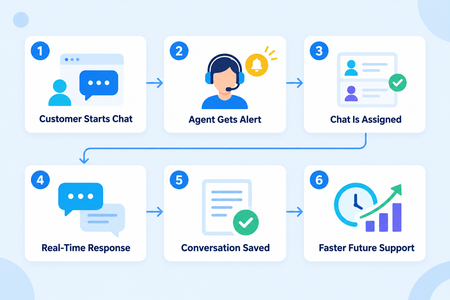
Customer Starts a Chat: A visitor opens the website chat window and sends a message with their question or issue.
Agent Receives a Notification: The Free live chat software alerts an available service representative about the new conversation.
Chat Gets Assigned: The system routes the conversation based on agent availability, workload, department, or expertise.
Agent Responds in Real Time: The assigned representative reviews the message and provides immediate assistance.
Conversation Details Are Saved: Messages, shared files, contact details, and notes are stored in the customer’s record.
Future Support Becomes Easier: Agents can review previous conversations, understand the context, and help customers without asking them to repeat their concerns.
Essential Features of Live Chat Software
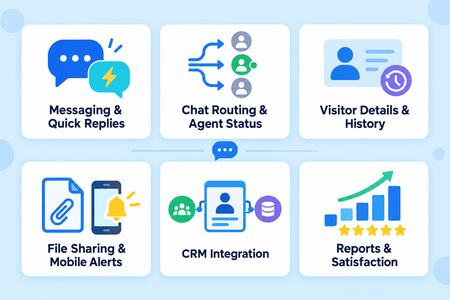
Effective live chat software combines real-time communication with tools that help teams organize conversations, respond faster, and monitor service performance. Important features include:
Real-Time Messaging: Allows agents and customers to communicate instantly through a website or application.
Automatic Chat Routing: Directs each conversation to the right agent based on availability, department, workload, or expertise.
Agent Availability Status: Shows which agents are online, busy, or unavailable, helping teams manage incoming chats efficiently.
Visitor Information: Displays useful details such as the visitor’s name, location, visited pages, and previous interactions.
Canned Responses: Provides prewritten answers for common questions, helping agents respond quickly while maintaining consistent information.
File Sharing: Allows customers and agents to exchange screenshots, documents, invoices, and other relevant files within the conversation.
Chat History: Stores previous messages and interaction details, giving agents the context needed to provide personalized support.
Mobile Notifications: Alerts agents about new messages and allows them to respond when they are away from their desks.
CRM Integration: Connects chat conversations with customer profiles, contact details, deals, tickets, and communication history.
Service Reports: Tracks response times, chat volume, resolution rates, agent performance, and customer satisfaction.
These features help agents manage conversations efficiently while giving managers a clear view of service quality and team performance.
How Live Chat Improves Customer Experience
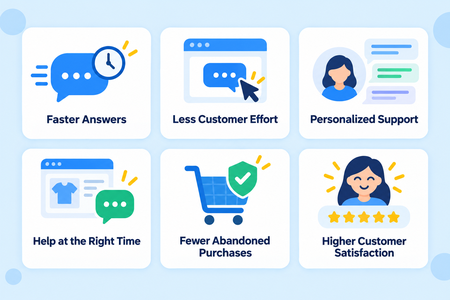
Provides Faster Answers: Customers receive immediate assistance without waiting for an email response or phone call.
Reduces Customer Effort: Visitors can ask questions directly from the website without switching to another communication channel.
Delivers Personalized Support: Agents can review customer details and previous conversations to provide relevant answers.
Offers Help at the Right Time: Customers can get assistance while comparing products, checking prices, or completing a purchase.
Prevents Purchase Abandonment: Quick support helps resolve confusion before a customer leaves the website or abandons checkout.
Builds Customer Satisfaction: Helpful real-time conversations create positive experiences that encourage customers to return.
How Live Chat Supports Sales and Lead Generation
Website live chat lets sales teams answer product questions and capture leads in the moment a visitor shows interest.
A rep chatting with a visitor can recommend the right product, clear up pricing confusion, and address objections before the visitor leaves the site.
The conversation itself becomes a chance to collect contact details and qualify the lead, all through real-time customer support instead of a form the visitor might never fill out.
Many purchasing decisions happen because someone answered a question at the exact right moment, and live chat creates that moment on demand.
Live Chat Support and AI Chatbots
AI chatbots and human agents work together to provide fast and effective customer support.
| AI Chatbot | Human Live Chat Agent |
|---|---|
| Answers common questions about pricing, business hours, and order status | Handles complex questions that require judgment or detailed explanations |
| Provides support during nights, weekends, and outside business hours | Provides personalized assistance during agent working hours |
| Greets visitors and collects basic contact information | Reviews customer details and provides relevant solutions |
| Identifies the customer’s needs through initial questions | Manages sensitive issues and frustrated customers |
| Transfers complex conversations with the complete chat history | Continues the conversation without asking customers to repeat information |
| Handles multiple routine conversations simultaneously | Focuses on conversations that need personal attention |
Connecting Live Chat With Helpdesk Ticketing
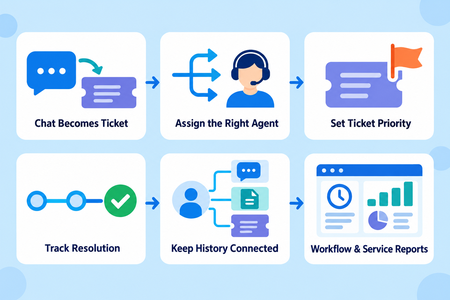
Live chat can connect with helpdesk ticketing to manage issues that require more time or additional support.
- Converts Chats Into Tickets: Unresolved chat conversations automatically become support tickets.
- Assigns the Right Agent: Tickets can be routed to the appropriate team member or department.
- Sets Request Priorities: Teams can prioritize urgent issues and handle them quickly.
- Tracks Resolution Progress: Agents can monitor each request from creation to final resolution.
- Keeps Customer History Connected: Chat messages, files, notes, and ticket updates remain in one customer record.
- Improves Support Workflows: Agents can manage chats and tickets without switching between disconnected systems.
- Measures Resolution Times: Managers can use service reports to track how long each issue takes to resolve.
Best Practices for Effective Live Chat Support
The best live chat support responds fast, stays personal, and hands off complex issues without losing context.
Strong teams follow a few habits:
- Respond quickly and use simple, friendly language
- Personalize conversations using the customer’s history
- Keep canned responses accurate and up to date
- Transfer complex questions to the right specialist
- Maintain full context when a chat moves between agents
- Collect feedback after each conversation
- Review agent performance regularly
These habits keep customer satisfaction high and stop small chat mistakes from becoming bigger service problems.

Deliver Better Live Chat Support With GoFox
Live chat support improves response times, deepens customer engagement, generates more leads, and raises the overall quality of service. It gives customers the fast, personal help they expect and gives your team a system for delivering it consistently.
GoFox connects live chat conversations, customer records, support workflows, and service reports in one platform, backed by a shared inbox so no message gets missed. Start with GoFox’s free live chat and give your customers faster, more organized support today at GoFox.
