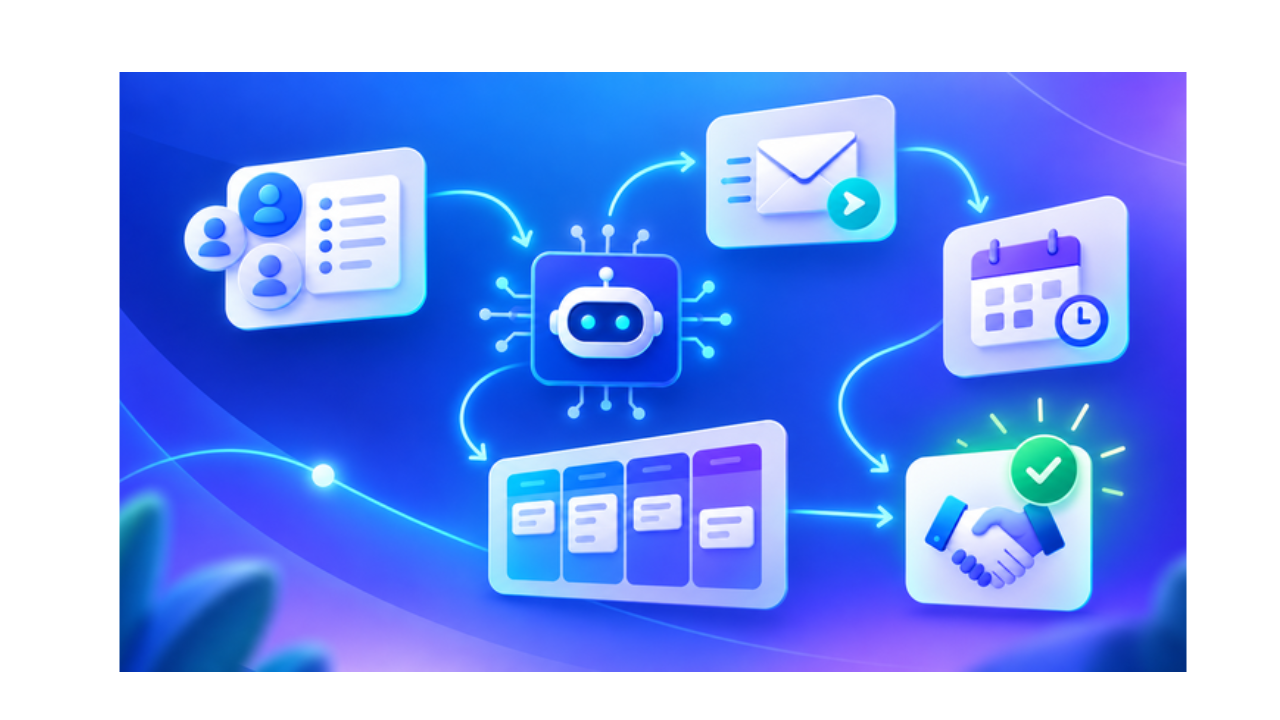
A sales representative finds duplicate names, several phone numbers, and missing call records across disconnected files. Scattered customer data makes contact histories difficult to understand.
Contact management software fixes this. It keeps every customer record in one place, updated and accessible to the people who need it. A team member opens one system and finds everything about a contact in seconds, without digging through inboxes or asking a colleague for a phone number.
This guide covers what contact management software does, how it works, the features that matter, and how to choose the right one for your business.
What Are AI Sales Workflows?
AI sales workflows are automated sequences that use artificial intelligence to complete sales tasks with minimal human input.
They combine three things:
- Artificial intelligence that reads data and makes decisions
- Automation that carries out actions without manual triggers
- CRM data that gives the AI context on every lead and deal
A basic example: a lead fills out a form, the AI scores the lead based on fit, and the CRM assigns it to the right rep, all within seconds. This is sales workflow automation in its simplest form
How Do AI Sales Workflows Work?
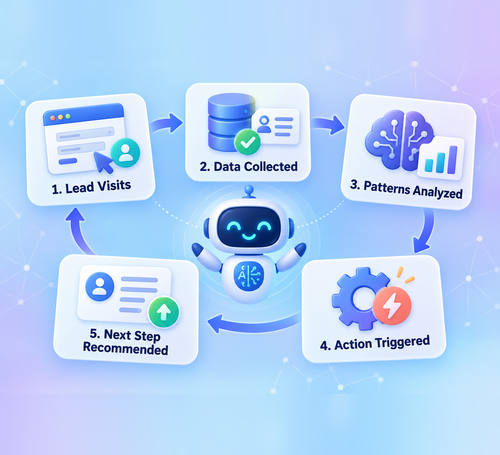
AI sales workflows work by collecting customer data, spotting patterns, and triggering the next best action automatically.
Here’s a simple version of the process:
- A lead visits the website or fills out a form
- The AI pulls in data from the CRM and other connected tools
- It looks for patterns based on past deals that closed or fell through
- It triggers an action, such as sending an email, scoring the lead, or alerting a rep
- It recommends a next step to keep the deal moving
This loop repeats at every stage, from lead capture to closed deal. That’s AI sales automation and CRM workflow automation working together.
Key Components of an AI Sales Workflow

Every AI sales workflow runs on a few core parts:
- Triggers – an event that starts the workflow, like a form submission or a website visit
- Conditions – rules that decide which path the workflow takes
- AI models – the engine that scores leads, predicts outcomes, or writes content
- Automated actions – emails, task creation, or CRM updates that happen without manual work
- CRM integrations – the connection that keeps data synced across tools
- Notifications – alerts that tell reps when to step in
- Performance tracking – reports that show what’s working and what isn’t
These parts make up the sales process automation stack most modern AI sales tools rely on.
Top AI Sales Workflows to Automate
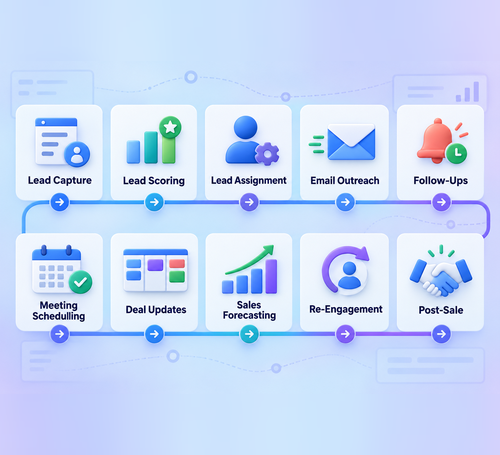
- Lead Capture and Data Entry: Automatically collects contact details from forms, emails, and other channels and adds them to the CRM.
- Lead Qualification and Scoring: Evaluates each lead’s behavior, interest, and conversion potential to help sales teams identify valuable prospects.
- Lead Assignment: Routes qualified leads to the right sales representative based on location, experience, availability, or other criteria.
- Personalized Email Outreach: Creates and sends relevant emails based on each prospect’s interests, actions, and sales stage.
- Automated Follow-Ups: Sends timely messages and reminders to keep prospects engaged throughout the sales process.
- Meeting Scheduling: Allows prospects to select available meeting times without lengthy email conversations.
- Deal Stage Updates: Automatically moves deals through the sales pipeline when specific conditions or activities are completed.
- Sales Forecasting: Uses pipeline data and previous performance to predict revenue and future sales results.
- Inactive Lead Re-Engagement: Identifies inactive prospects and sends targeted messages to regain their interest.
- Post-Sale Follow-Ups: Sends onboarding messages, feedback requests, and check-ins after a deal is closed.
These workflows automate the buyer journey from initial lead capture to post-sale engagement, helping teams manage their sales pipeline more efficiently.
Benefits of AI Sales Workflows
AI sales workflows save time, speed up response rates, and help reps close more deals.
The main benefits include:
- Reduced manual work across the sales team
- Faster response times to new leads
- Accurate lead prioritization based on data, not guesswork
- Consistent follow-ups that don’t rely on memory
- Improved productivity for every rep
- Shorter sales cycles from first contact to close
- More conversion opportunities from leads that used to fall through the cracks
Teams that adopt AI sales automation often report reps spending far less time on admin work and far more time selling.
How AI Sales Workflows Improve Lead Management
AI sales workflows capture leads from forms, chat, email, and social platforms. They remove duplicate records, enrich contact profiles with missing information, and keep CRM data accurate.
AI lead scoring evaluates prospects based on fit, intent, and engagement. Leads are automatically assigned to the right sales representatives, helping teams prioritize valuable prospects and respond faster.
How to Implement AI Sales Workflows
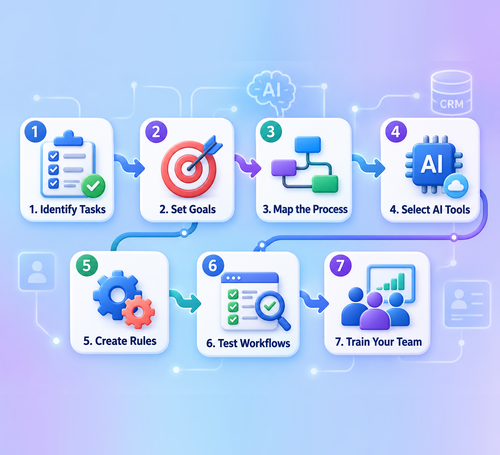
Follow these steps to implement AI sales workflows effectively:
- Identify repetitive tasks: List time-consuming activities such as data entry, lead assignment, and follow-up emails.
- Set clear goals: Decide what you want to improve, such as response times, lead conversions, or sales productivity.
- Map your sales process: Review each stage from lead capture to deal closure and identify where automation can help.
- Select the right AI tools: Choose tools that support your workflow requirements and integrate with your existing CRM.
- Create automation rules: Define the triggers, conditions, and actions for each workflow.
- Test the workflows: Start with a small group of leads, review the results, and fix any issues before launching them fully.
- Train your sales team: Explain how each workflow works and how it supports daily sales activities.
A step-by-step rollout reduces disruption and helps your team adopt AI sales workflow automation more easily.
Best Practices for AI Sales Workflow Automation
Follow these practices to get better results from AI sales automation:
- Keep CRM data accurate: Regularly update contact details and remove duplicate records to help AI produce reliable results.
- Begin with simple workflows: Automate basic tasks first before creating complex, multi-step sales workflows.
- Personalize automated messages: Use relevant customer information to make emails and follow-ups feel natural.
- Include human approval: Require team members to review high-value deals and sensitive communications before taking action.
- Track workflow performance: Review response rates, conversions, and errors to identify workflows that need improvement.
- Update automation rules: Adjust triggers, conditions, and actions whenever your sales process changes.
These practices help your AI sales tools remain accurate, effective, and aligned with your sales goals.

Build Smarter Sales Workflows With GoFox
AI sales workflows help teams automate lead scoring, follow-ups, data entry, and pipeline updates. This reduces manual work, prevents leads from being missed, and gives sales representatives more time to build relationships and close deals.
GoFox brings sales, marketing, and service automation together in one AI-powered CRM. Explore GoFox today and start building smarter sales workflows for your business.
