
A sales representative finds duplicate names, several phone numbers, and missing call records across disconnected files. Scattered customer data makes contact histories difficult to understand.
Contact management software fixes this. It keeps every customer record in one place, updated and accessible to the people who need it. A team member opens one system and finds everything about a contact in seconds, without digging through inboxes or asking a colleague for a phone number.
This guide covers what contact management software does, how it works, the features that matter, and how to choose the right one for your business.
What Is Contact Management Software?
Contact management software is a digital system that stores and organizes customer information. This includes names, phone numbers, email addresses, company details, notes, documents, and a full history of past communication.
Good contact database software stores names and links every email, call, meeting, and note to the correct contact record. Each contact profile displays complete information beyond a name and phone number.
Most businesses use contact management tools as part of a larger CRM contact management system, where contact records connect directly to sales deals, marketing campaigns, and support tickets.
How Does Contact Management Software Work?
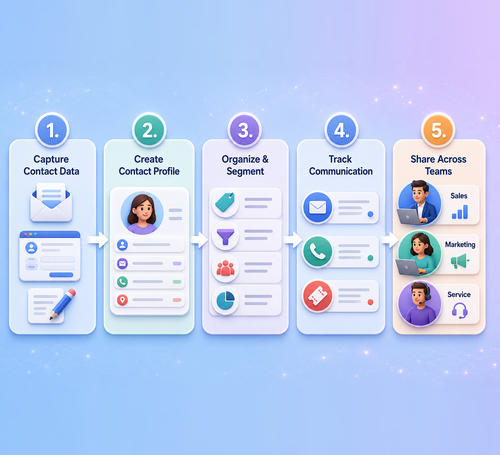
The software captures contact details from emails, web forms, and manual entries. Each new contact receives a structured profile.
Teams can update records, add tags for segmentation, and filter by location, industry, or activity date.Authorized sales, marketing, and service team members access the same accurate record from one centralized system.
Emails, calls, and support tickets attach to each contact record automatically. Every interaction appears in a complete customer timeline.
Why Is Contact Management Software Important?
Businesses lose time and revenue when customer records are inaccurate or scattered. A sales representative who cannot find a client’s last conversation may repeat questions the customer has already answered.
A marketing team without clean contact data may send campaigns to the wrong audience. Missing information also increases the risk of delayed responses, poor communication, and dropped follow-ups.
Contact management software keeps records accurate as the customer base grows. It gives every team the same source of truth, supports stronger customer relationships, and protects valuable opportunities.
Essential Features of Contact Management Software
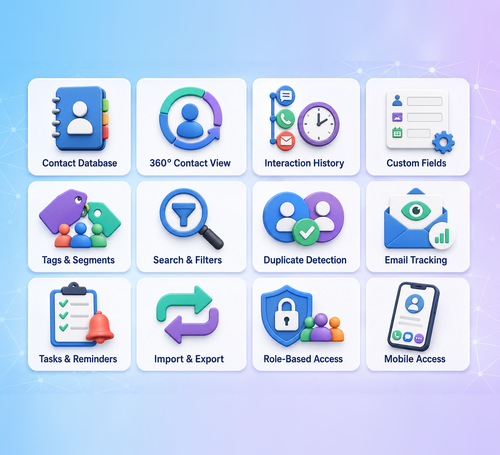
- Centralized contact database: Every customer record lives in one searchable system instead of spreadsheets or personal notes.
- 360-degree contact view: A 360 degree contact view shows contact details, past conversations, deals, tickets, and notes on a single screen.
- Complete interaction history: Every call, email, meeting, and note is logged and timestamped automatically.
- Custom contact fields: Teams can add fields specific to their business, like industry, referral source, or account type.
- Tags and contact segmentation: Contacts can be grouped by behavior, location, or lifecycle stage for targeted outreach.
- Advanced search and filters: Teams find specific contacts quickly using multiple search criteria at once.
- Duplicate contact detection: The system flags or merges repeated entries so records stay clean.
- Email and communication tracking: Use Email Marketing to send emails and replies directly from the contact record without manual entry.
- Notes, tasks, and reminders: representatives can log details and set follow-up reminders tied to a specific contact.
- Contact import and export. Data moves in and out of the system easily, useful during migrations or list building.
- Role-based access. Businesses control who can view or edit specific contact records.
- Mobile contact access. Teams can check and update records from a phone while traveling or meeting clients.
Key Benefits of Contact Management Software
well-built contact management system delivers measurable gains across every customer-facing team:
- Keeps customer information organized
Every record sits in one searchable system instead of scattered spreadsheets and notes. - Saves time searching for contact details
Teams stop digging through inboxes and old files to find a phone number or history. - Improves customer communication
Every representative works from the same updated record, so no one repeats questions a customer already answered. - Personalizes sales and marketing activities
Real customer data replaces guesswork, letting teams tailor outreach to each contact. - Strengthens team collaboration.
Shared contact details, notes, and history stop departments from working in silos. - Manages follow-ups efficiently
Reminders and tasks tied directly to each contact keep follow-ups on schedule. - Reduces duplicate and outdated record
Automated cleanup prevents old or repeated entries from piling up over time. - Builds stronger customer relationships
Organized, accurate data turns one-off transactions into long-term relationships.
How Contact Management Software Supports Different Teams

Sales Teams
Sales reps use contact records to see a lead’s full history before every call. They can review past conversations, track where a contact sits in the pipeline, connect records to active deals, and schedule follow-ups without losing context between calls.
Marketing Teams
Marketers rely on contact segmentation to build targeted campaigns. Accurate customer data means messages reach the right audience based on interests, behavior, or purchase history, which improves open rates and response rates compared to generic outreach.
Service Teams
Support agents pull up a contact’s history the moment a ticket comes in. Knowing what a customer purchased, when they last reached out, and what issues came up before helps agents resolve requests faster and with more context.
Contact Management Software vs CRM Software
| Aspect | Contact Management Software | CRM Software |
|---|---|---|
| Core focus | Stores and organizes customer information | Connects contact records to the full customer lifecycle |
| Data scope | Names, numbers, emails, notes, communication history | Contact data plus deals, campaigns, tickets, and reports |
| Sales pipeline | Not included | Tracks deals and pipeline stages tied to each contact |
| Marketing campaigns | Not included | Runs and measures campaigns using segmented contact data |
| Customer service | Not included | Links support tickets and case history to the contact |
| Automation | Limited or none | Automates follow-ups, workflows, and lead routing |
| Reporting | Basic contact records only | Dashboards covering sales, marketing, and service performance |
| Best fit | Businesses that only need organized contact records | Businesses that want contact data driving sales, marketing, and service together |
How AI Improves Contact Management
AI-powered contact management reduces manual work through automated data entry, duplicate detection, and contact enrichment. It keeps customer records accurate without constant updates.
AI analyzes customer behavior to prioritize leads, recommend follow-ups, personalize communication, and update contact segments as customer activity changes.
How to Choose Contact Management Software
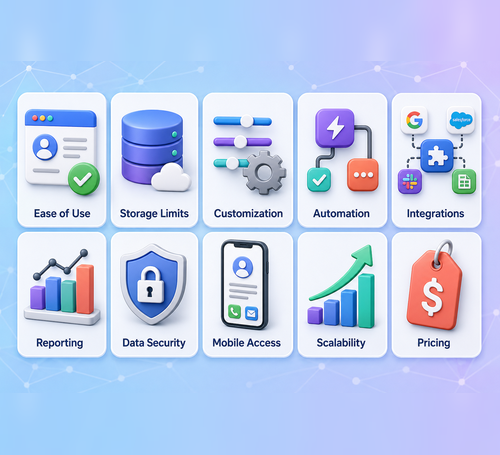
Choosing the right platform depends on how your team plans to use it day to day:
- Ease of use. A system your team avoids opening provides no value regardless of its features.
- Contact storage limits. Confirm the software can grow with your database as records increase.
- Customization. Check that fields and layouts can adapt to your industry’s specific needs.
- Automation features. Look for tools that handle follow-ups, reminders, and routine tasks automatically.
- Integration options. The software should connect easily with the other tools your team already uses.
- Reporting capabilities. Strong reporting helps you measure how well your contact management efforts are working.
- Data security. Non-negotiable, particularly if you handle sensitive customer information.
- Mobile access. Confirm the platform works well for teams checking records on the go.
- Scalability. The system should still perform well as your team and customer base expand.
- Pricing. Match the plan to the features you actually need instead of paying for tools you will not use.
Contact Management Best Practices
Contact Management Best Practices
- Review contact data regularly: Check the database for missing fields, formatting errors, inactive contacts, and inaccurate information.
- Use consistent contact fields: Keep the same format for names, phone numbers, job titles, industries, and company details across every record.
- Update customer records regularly: Review contact information often to prevent outdated details from affecting communication, campaigns, or reports.
- Remove duplicate contacts: Merge repeated entries as soon as they appear to keep the database clean, accurate, and easy to search.
- Create useful contact segments: Group contacts by behavior, location, industry, interests, or lifecycle stage for more relevant outreach.
- Record every important interaction: Add calls, emails, meetings, support requests, and notes immediately while the details remain accurate.
- Schedule follow-up activities: Create tasks and reminders inside the system to prevent missed calls, emails, meetings, or sales opportunities.
- Set role-based permissions: Control which teams can view, add, edit, export, or delete customer information based on their responsibilities.
Who Should Use Contact Management Software?
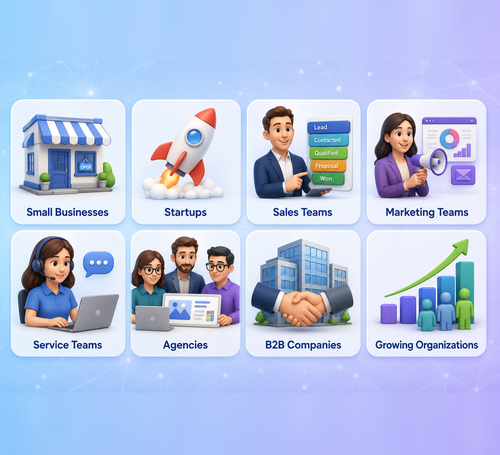
Contact management software fits any business that deals with customer relationships at scale:
- Small businesses. Stay organized without hiring a large operations team.
- Startups. Build clean customer records early, before data gets messy.
- Sales teams. Manage leads and track every deal-related conversation.
- Marketing teams. Run targeted campaigns using segmented, accurate contact data.
- Service teams. Handle support requests faster with full customer context on hand.
- Agencies. Track multiple clients and contacts across separate accounts.
- B2B companies. Manage longer sales cycles involving multiple stakeholders per deal.
- Growing organizations. Scale contact data alongside the business instead of letting records break down as they multiply.

Conclusion
Contact management software brings order to customer data that would otherwise live in scattered spreadsheets and inboxes. A centralized database, 360-degree contact views, and AI-powered intelligence help sales, marketing, and service teams work from one accurate source of truth and build stronger customer relationships.
Ready to bring every customer record into one place? Start your free trial with GoFox today.
