
A customer waits three days for a reply to a simple billing question. She gets frustrated, posts a review, and switches to a competitor. Two other buyers read that review and walk away too. One slow customer support response costs the business three customers.
Good support shapes customer experiences through quick answers, effective problem resolution, trust, satisfaction, and business growth. This guide explains its importance and ways to improve it.
What Is Customer Support?
Customer support helps customers with questions, problems, and product or service usage. Support teams assist customers at every stage of their experience.
Support teams represent the business. Customers often interact directly with support agents. Each conversation affects how customers view the brand. Support agents hear customer feedback, questions, concerns, and requests. This information helps product and sales teams improve their work.
Why Is Customer Support Important?

Customer support directly impacts customer satisfaction, loyalty, retention, and business growth.
- Customer satisfaction: Fast, helpful answers turn frustrated people into happy ones.
- Brand reputation and business growth: Happy customers leave good reviews and refer friends. Poor service spreads just as fast.
Businesses that invest in support see the payoff in repeat purchases and lower churn.
What Are the Types of Customer Support?

- Free live chat: Provides quick, real-time assistance through a website or app.
- Email support: Helps resolve detailed or complex customer queries.
- Phone support: Offers direct assistance for urgent or sensitive issues.
- Social media support: Lets businesses answer customer questions on social platforms.
- Self-service support: Allows customers to find answers through a help center or customer self-service portal.
Using the right combination of support channels helps businesses respond faster and deliver a better customer experience.
Which Customer Support Channels Do Businesses Use?
Businesses commonly use website chat, email, phone, social media, and help centers.
Customers want to pick the channel that suits them. A chat widget on your website gives instant answers. Email keeps a written record of the conversation. Phone calls handle tense moments with a calm human voice.
Social media lets brands reply in public, which shows care to everyone watching. Help centers and knowledge bases let customers solve common problems at midnight without waiting for an agent.
Offering several channels meets people where they already are.
What Does a Customer Support Team Do?
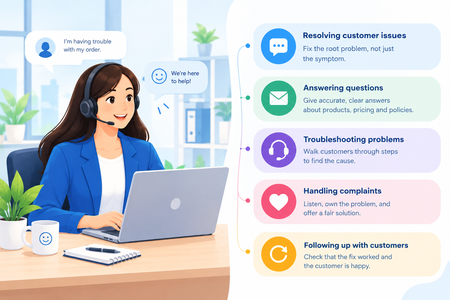
A support team resolves issues, answers questions, troubleshoots problems, handles complaints, and follows up with customers.
- Resolving customer issues: Fix the root problem, not just the symptom.
- Answering questions: Give accurate, clear answers about products, pricing, and policies.
- Troubleshooting problems: Walk customers through steps to find the cause.
- Handling complaints: Listen, own the problem, and offer a fair solution.
Good teams share the patterns they notice with product and marketing teams. A question asked fifty times is a signal that something needs to change.
What Features Should a Customer Support System Have?
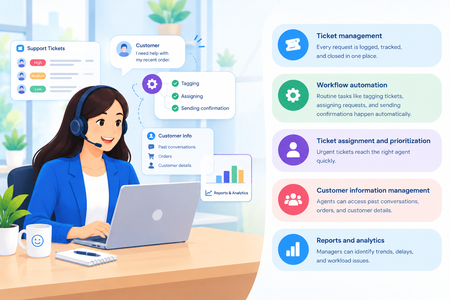
A good support system includes ticket management, workflow automation, ticket assignment, customer information, and reporting.
- Ticket management: Every request is logged, tracked, and closed in one place.
- Workflow automation: Routine tasks like tagging tickets, assigning requests, and sending confirmations happen automatically.
- Ticket assignment and prioritization: Urgent tickets reach the right agent quickly.
- Customer information management: Agents can access past conversations, orders, and customer details.
- Reports and analytics: Managers can identify trends, delays, and workload issues.
What Are the Best Practices for Effective Customer Support?
Respond quickly, communicate clearly, personalize every interaction, resolve issues efficiently, and follow up.
Speed matters. Customers judge a brand by response time. Set clear response targets and meet them. Use plain words. Avoid jargon and long blocks of text. Use the customer’s name and review their history. Keep the customer’s issue visible throughout the conversation.
A resolution check builds trust and identifies unresolved problems.
How Does Technology Improve Customer Support?
Technology speeds up answers, connects customer data, and lets small teams serve many customers.
- CRM integration: Support teams see the complete customer record with sales and marketing history.
- AI and automation: Chatbots answer common questions and suggest replies to agents.
- Omnichannel support: Chat, email, phone, and social conversations live in one thread.
- Customer data management: Every interaction is stored and easy to search.
- Automated workflows: Tickets route, escalate, and close by set rules.
GoFox is AI-powered CRM software that brings sales, marketing, and customer service into one platform. Tools like Help Desk, Free Live Chat, and Knowledge Base give support teams everything they need to help customers faster.
How Do You Measure Customer Support Performance?
Measure support with CSAT, first response time, average resolution time, first contact resolution, and customer effort score.
- Customer Satisfaction Score (CSAT): Customers rate their experience, often on a scale of 1 to 5.
- First Response Time (FRT): How long a customer waits for the first reply.
- Average Resolution Time: How long a ticket takes to close.
- First Contact Resolution (FCR): The share of issues fixed in the first interaction.
- Customer Effort Score (CES): How easy customers found it to get help.
How Can You Improve Customer Support and Customer Experience?
Collect feedback, train your team, refine your processes, use the right tools, and keep optimizing.
- Collect and analyze customer feedback: Send short surveys and read the comments closely.
- Train support teams: Teach product knowledge, empathy, and clear writing.
- Improve response and resolution processes: Remove steps that slow tickets down.
- Use the right support tools: Pick software that fits your team size and channels.
- Continuously optimize the experience: Review metrics every month and test small changes.
Great support is never finished. Each improvement makes the next customer’s experience smoother.

Conclusion
Effective customer support builds trust, improves satisfaction, and strengthens lasting relationships.
With the right channels, automation, workflows, and self-service tools, businesses can resolve issues faster and create better experiences.
Ready to simplify support? Explore GoFox today and bring your support, automation, and customer management into one platform.
